

Holders Registry
Sharing Your Certifications on Linkedin
Celebrate your achievement as a holder or candidate of an EFFAS certification, whether you are an EFFAS Certified ESG Analyst® (CESGA), a Certified European Financial Analyst (CEFA) by EFFAS, a Certified ESG Essentials®, Certified Digital Assets & MiCA®, EFFAS Certified Climate Risk Analyst® (ECRA), EFFAS Certified Investment Manager® (ECIM), EFFAS Certified Portfolio Manager® (ECPM), EFFAS Certified Financial Manager® (ECFM) or EFFAS Financial Risk Analyst® (EFRA) holder — or currently a candidate in any of these esteemed programmes. All EFFAS programmes adhere to globally recognised high standards, safeguarding the prestige of certifications that command respect across the financial industry. Display your credentials with pride, while following the applicable guidelines to ensure their correct and consistent use.
INSTRUCTIONS
Highlight Your Career with Your Digital Certification
Log in to your LinkedIn account.
Go to your LinkedIn profile and click on the ‘Add profile section’ button.
Add the Certification
Select ‘Add licenses & Certifications’ from the dropdown menu.
Complete the information
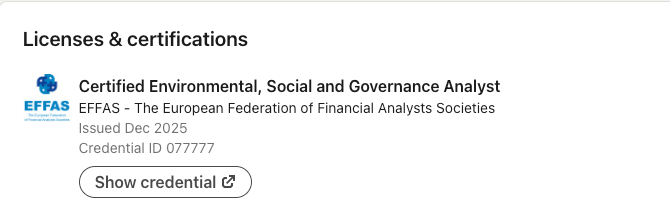
Fill in the relevant information about your digital badge, including the name, issuer, and issue date.
You can also add a link to the PDF file from your certificate in the ‘Credential URL’ field, so others can verify your certification.
04
Save your new badge
Click ‘Save’ to add the digital badge to your LinkedIn profile.
Now, your digital badge will be displayed on your LinkedIn profile for others to see and verify.
05
Share Your Candidate Status on LinkedIn
Go to your LinkedIn profile and click on the ‘Add to profile section’ button.
Add the Test Score
Under “Additional”, select “add test score”.
- Enter the certificate for which you are a candidate.
- In “Score” add “Pass” after passing the certification exam.
- Enter the month and year of the date you passed the exam.
- Select Save.
07
Save and Share!
Do not include your candidacy or an “Expected” date in your profile header; the Code and Standards forbid implying partial designation award.

Holders Registry
EFFAS Professional Certificate Verification
To verify the professional qualification of an EFFAS certificate holder, please follow the steps below and send an email to the EFFAS Certifications Office, with the required information:
- Signed Screening Authorization: Attach a signed screening authorization from the candidate. This document is necessary to grant us permission to proceed with the verification process.
- Full Name and Surname: Provide the candidate’s full name and surname to ensure accurate identification.
- Exam Pass Date: Include the date when the candidate successfully passed the certification exam.
- Country of Study: Indicate the country where the candidate pursued their studies and took the certification exam.
- Scanned Copy of the Certificate (Optional): If available, please include a scanned copy of the certificate in question. This can expedite the verification process.
Please note that verification requests will only be processed once all the required information listed above has been provided.
We are committed to responding to your inquiry as soon as possible.
EFFAS encourage you to keep developing your knowledge and career and take them to the next level. If you want to know more visit our LinkedIn page:
Certified European Financial Analyst (CEFA) by EFFAS is the official designation of the CEFA training programme and certification. As this designation is not a registered trademark, holders are requested to always use the full wording “CEFA by EFFAS” in all professional communications, including LinkedIn and other social media platforms.