

Sharing Your Certifications on Linkedin
Celebrate your achievement as a holder or candidate of an EFFAS certification, whether you are an EFFAS Certified ESG Analyst® (CESGA), a Certified European Financial Analyst (CEFA) by EFFAS, a Certified ESG Essentials®, Certified Digital Assets & MiCA®, EFFAS Certified Climate Risk Analyst® (ECRA), EFFAS Certified Investment Manager® (ECIM), EFFAS Certified Portfolio Manager® (ECPM), EFFAS Certified Financial Manager® (ECFM) or EFFAS Financial Risk Analyst® (EFRA) holder — or currently a candidate in any of these esteemed programmes. All EFFAS programmes adhere to globally recognised high standards, safeguarding the prestige of certifications that command respect across the financial industry. Display your credentials with pride, while following the applicable guidelines to ensure their correct and consistent use.
Highlight Your Career with Your Digital Certification
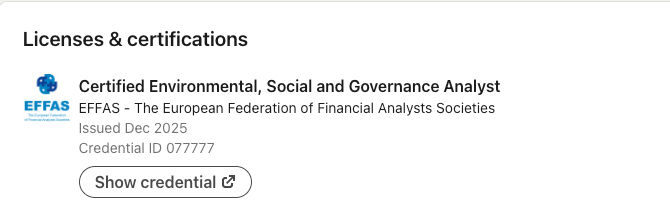
After earning your EFFAS certification — including CESGA, CEFA by EFFAS, ESG Essentials, Digital Assets & MiCA (DiAM), ECRA, ECIM, ECPM, ECFM, or EFRA — please follow the guidelines below, specifically tailored for LinkedIn, to correctly update the Licences and Certifications section of your profile.

How to Share Your Certifications on LinkedIn:
To access and add the digital badge to your LinkedIn profile, please follow these steps:
- Log in to your LinkedIn account.
- Go to your LinkedIn profile and click on the ‘Add profile section’ button.
- Select ‘Add licenses & Certifications’ from the dropdown menu.
- Fill in the relevant information about your digital badge, including the name, issuer, and issue date.
- You can also add a link to the PDF file from your certificate in the ‘Credential URL’ field, so others can verify your certification.
- Click ‘Save’ to add the digital badge to your LinkedIn profile.
Now, your digital badge will be displayed on your LinkedIn profile for others to see and verify.
How to Share Your Candidate Status on LinkedIn:
- Log in to your LinkedIn account.
- Go to your LinkedIn profile and click on the ‘Add to profile section’ button.
- Under “Additional”, select “add test score”.
- Enter the certificate for which you are a candidate.
- In “Score” add “Pass” after passing the certification exam.
- Enter the month and year of the date you passed the exam.
- Select Save.
Do not include your candidacy or an “Expected” date in your profile header; the Code and Standards forbid implying partial designation award.
We are committed to responding to your inquiry as soon as possible.
EFFAS encourage you to keep developing your knowledge and career and take them to the next level. If you want to know more visit our LinkedIn page:
Certified European Financial Analyst (CEFA) by EFFAS is the official designation of the CEFA training programme and certification. As this designation is not a registered trademark, holders are requested to always use the full wording “CEFA by EFFAS” in all professional communications, including LinkedIn and other social media platforms.